Garmin ActiveCaptain®
GarminMaps & Navigation
4.1815.00 Reviews
- Version
- 44.0.3459
- Installs
- 1.00M
- Age Rating
- Everyone
Screenshots
Our Review of Garmin ActiveCaptain®
 Analysis by Appyee
I think Garmin ActiveCaptain makes the most sense as a companion to a compatible Garmin chartplotter, not as a standalone substitute for dedicated marine equipment. Its appeal is the bridge between planning on a phone and working with a plotter aboard: preparing at home, keeping information in step, and using the mobile device as another way to interact with the Garmin setup. If you boat with Garmin gear, that connection can save time. If you do not, much of the reason to choose this app disappears.
A companion for the whole boating routine
Boating preparation often happens in small gaps: checking a route before leaving home, looking over a destination while travelling to the marina, or making a last-minute change before departure. ActiveCaptain is aimed at that routine. Rather than treating the phone and chartplotter as separate islands, it gives Garmin users a way to plan and review on a handheld screen and then carry that work into the onboard setup.
That is a different job from a general road-navigation app. A road app is built around getting from one address to another; this one belongs to the marine-navigation side of Maps & Navigation and is designed around a Garmin plotter. The distinction matters when choosing what to install: it is not a broad boating toolkit that makes every other navigation aid unnecessary, but a practical extension of compatible Garmin equipment.
The app is free, and its Everyone age rating makes it broadly accessible, but those facts do not make it useful to every phone owner. Its audience is defined much more by equipment and boating habits than by age or price. I would first ask whether I have a Garmin chartplotter I expect to use, then decide whether mobile planning and access to related information would improve my routine.
Where the connection earns its place
The strongest reason to use Garmin ActiveCaptain® is continuity. A route can be considered away from the helm, then synced with the chartplotter when it is time to go. That shift in setting is more than a convenience: it lets a boater do careful preparation somewhere comfortable, rather than trying to make every decision while standing at the console.
For example, imagine planning a day trip the evening before. I can review the intended route on a phone or tablet, make adjustments without crowding the helm, and then bring the plan across to the Garmin device. On the day, the plotter remains the central onboard reference, while the phone can help with planning or checking information. That division of labour is sensible: a handheld screen is comfortable for preparation, while the installed device is the more natural place to follow a route underway.
Garmin describes the app as a connection to its GPS plotter, and Garmin has developed it around that role. The app’s store summary is brief, but the practical idea is clear: it connects mobile planning with compatible Garmin marine equipment. The listing shows a 4.1 average from around 6,600 ratings, with roughly 775 written reviews and over one million installs. I take that as evidence of a substantial audience, not a promise that every plotter owner will find the same workflow smooth.
One useful habit is to treat syncing as a deliberate pre-departure step. I would check that the plan has reached the device before leaving the dock rather than assume that a route prepared on the phone is already available where it matters. That small check keeps the phone from becoming an unplanned point of failure once attention should be on the boat and surroundings. For the same reason, I would not make a mobile app the only place I keep essential trip information.
What it does not replace
The integration is also the main limitation. Without the relevant Garmin hardware, the app’s core purpose is harder to justify, so a boater using another manufacturer’s plotter should compare options designed for that equipment instead. Someone who only wants occasional directions on land will likely get more value from a conventional maps app. ActiveCaptain is most convincing when it fits an existing marine setup, not when it is expected to create one by itself.
I would also keep a clear distinction between useful supporting information and a complete safety plan. Community comments about marinas and waterways can add timely local perspective, but they are user contributions, not a substitute for checking conditions and making sound decisions on the water. A recent comment can be helpful context; it should not be treated as authoritative navigation guidance. Likewise, chart and software updates are valuable, but checking for updates is a task to do before a trip, not something I would leave until I am relying on the equipment.
That makes the app less suited to people who expect a phone to handle every part of navigation independently. I would not choose it as my only answer for a boat without a Garmin plotter, nor would I assume that features built around compatible hardware will be available in the same way on every setup. Its value depends on the particular Garmin equipment and on how a boater intends to use it.
Seamless Integration with Your Garmin Devices
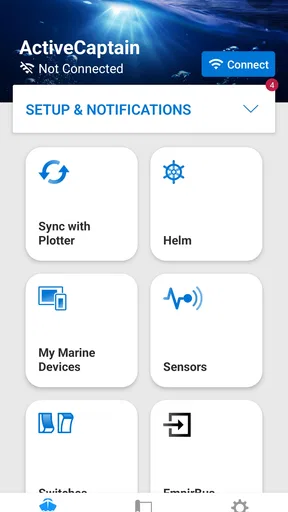
One of the first things you’ll notice about Garmin ActiveCaptain® is how smoothly it integrates with Garmin devices. If you’re already invested in the Garmin ecosystem, this app is a no-brainer. It syncs up with your chartplotter, letting you plan and review routes directly from your phone or tablet. No more hunching over screens or dealing with cumbersome menus. It’s all right there at your fingertips.
The app also allows for automatic updates to your Garmin device, which, let’s be honest, is a lifesaver. You can update your charts and software without having to be in front of your hardware. And if you’re planning a trip, you can do it all from the comfort of your couch, then sync everything up when you’re ready to set sail.
User-Friendly Interface
Navigating through ActiveCaptain is a breeze. The interface is intuitive, which means you won’t be spending hours trying to figure out how to do simple things. The menu is well-organized, and everything is just where you’d expect it to be. Whether you’re a tech-savvy sailor or someone who just prefers things to be straightforward, this app won’t disappoint.
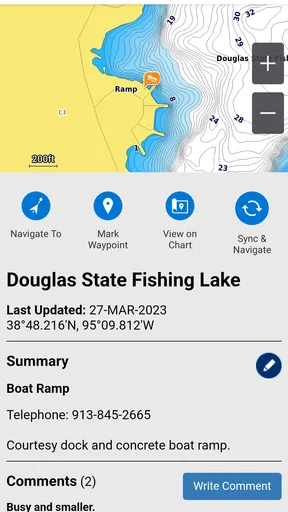
Another thing I love is the community aspect of the app. Users can leave reviews and updates about marinas and local waterways, which is super helpful. You’re not just relying on outdated guides; you’ve got real-time info from people who’ve been there recently.
Features That Stand Out
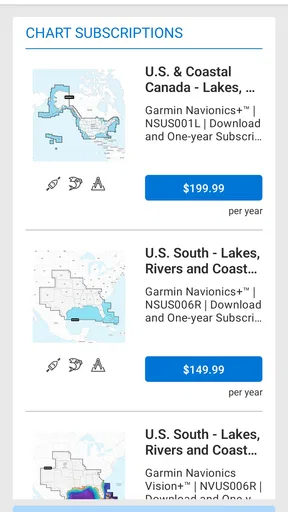
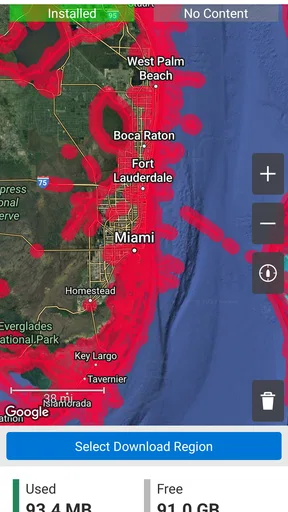
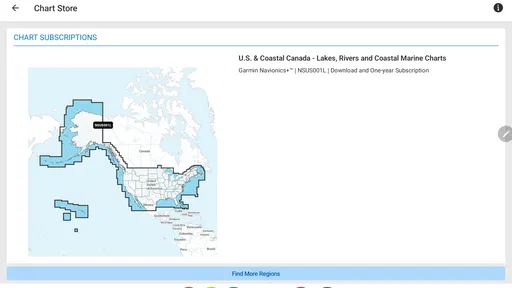
Let’s talk about some of the features that really make this app shine. First off, the OneChart feature is a must-have. It lets you access all your charts in one place, so you’re not constantly flipping between different screens or apps. Plus, you can purchase new charts directly through the app, which is super convenient.
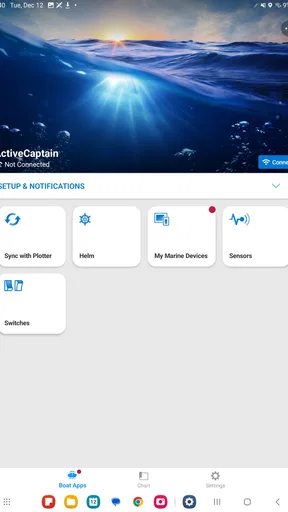
Another highlight is the Smart Notifications feature. When you’re out on the water, you don’t want to be glued to your phone, but you also don’t want to miss important messages. This feature sends notifications from your phone to your chartplotter, so you’re always in the loop without being tethered to your device.
I also can’t forget to mention the Helm feature, which allows you to view and control your chartplotter from your phone. Imagine being able to adjust settings or check your route while lounging in the cabin. It’s like having a portable command center in your pocket.
Everyday choices that make a difference
These tools are most useful when each has a clear role. I would use the phone for route preparation, chart access and checking community notes, then rely on the chartplotter as the main reference at the helm. Notifications may be convenient, but they are not a reason to watch a phone while navigating. Keeping the display glanceable and attention on the water is a better trade-off than trying to bring every phone function into the boating day.
The community side has a more subtle benefit: it can help you frame better questions before arriving somewhere unfamiliar. A marina note may prompt me to check access, facilities or local conditions before setting out, rather than discovering that I need more information once I am close. I would use those posts as leads to verify, not as a guarantee that conditions remain unchanged. This is especially important when a comment is old or describes a visit that may not match my boat or plans.
For chart and software updates, I would make a habit of checking before a trip when I have time and a reliable connection. Updates are easier to manage while planning than during a rushed departure. I would also confirm that the charts I need are available on the devices I intend to use; having a chart-related feature in an app should not be confused with having every desired chart ready for every situation.
Choosing it over other navigation options
Compared with a general-purpose mapping app, ActiveCaptain is narrower but more relevant to a Garmin boating setup. A conventional maps app is usually the better choice for driving to the launch point or finding an address on land. A separate marine-navigation product may be a better fit for someone whose boat uses another brand’s hardware or who wants an independent phone-based workflow. ActiveCaptain’s advantage is not that it does every kind of navigation; it is that it connects a Garmin chartplotter with mobile planning and related services.
That focus is a strength for existing Garmin users and a genuine drawback for everyone else. If I were buying a chartplotter, I would compare the complete equipment ecosystem rather than choose hardware because of one companion app. If I already owned compatible Garmin equipment, though, the free app would be an easy one to try, provided I was prepared to learn how syncing and chart access fit my own device setup.
Garmin ActiveCaptain is listed as version 42.0.3266 and requires Android 10 or later. It was released on October 31, 2017, and its ongoing version number signals that it remains an actively versioned app, although I would still check compatibility on my own phone and plotter before making it part of a trip routine. Garmin is the developer, and the free download lowers the barrier to trying the companion workflow without turning the app into a universal solution.
Who should make room for it
I would recommend it first to recreational boaters who already use a compatible Garmin chartplotter and want to prepare routes away from the helm, keep charts and software current, or consult local user observations. It can also suit people who share trip preparation: one person can think through a route on a handheld screen before the crew arrives at the boat. The benefit is practical rather than flashy—less time working through setup at departure and a more convenient way to carry planning into the onboard system.
I would tell a new boater to learn the plotter itself as well as the app. A familiar mobile interface can make preparation easier, but comfort with a phone should not be mistaken for competence with the equipment used underway. I would practise syncing and checking the route while docked, and keep a sensible backup plan for navigation rather than relying on one device or one connection.
People with no Garmin plotter, boaters who rarely use marine navigation, and anyone seeking a standalone replacement for dedicated equipment should look elsewhere or compare alternatives first. The same goes for someone who wants a broad all-purpose map for daily driving: ActiveCaptain’s marine focus is not an advantage for that job. Its best audience is specific, and knowing that before installing saves time and avoids expecting the wrong kind of app.
Why It’s Worth a Download
Alright, so you might be wondering, is this app really worth downloading? In my opinion, absolutely. If you’re someone who spends a lot of time on the water, whether for leisure or work, having an app that integrates all your boating needs into one place is invaluable.
It’s not just about convenience, though. ActiveCaptain also enhances safety. With access to up-to-date charts and community information, you’re better equipped to handle whatever the seas throw at you. Plus, the ability to sync everything with your Garmin devices means you’re always operating with the latest data.
So, if you’re ready to make your boating trips smoother, safer, and more enjoyable, head over to your app store and give Garmin ActiveCaptain® a try. Trust me, once you get the hang of it, you’ll wonder how you ever sailed without it.
A measured final call
My recommendation comes with one important condition: treat it as a well-targeted companion, not a shortcut around preparation or sound judgment. Before heading out, I would confirm the route is on the plotter, check the relevant charts and updates, and use community information as a prompt for further checking. Those steps make the app’s convenience more dependable without asking it to do more than it is designed to do.
For a Garmin owner who plans trips regularly, ActiveCaptain is worth trying because its free price makes it an accessible way to connect mobile planning with the chartplotter. For someone outside that ecosystem, the same focus is a reason to pass. That is the clearest verdict I can offer: useful when it fits the boat and the routine, but not a universal navigation app—and best used alongside, rather than instead of, careful on-water decision-making.
Verdict
Strengths of Garmin ActiveCaptain®
- Seamless integration with Garmin devices.
- User-friendly interface for navigation.
- Real-time weather updates available.
- Access to community-based reviews.
- Offline maps for remote areas.
Limitations of Garmin ActiveCaptain®
- Requires strong internet for full features.
- Limited compatibility with non-Garmin devices.
- Battery drain on prolonged use.
- Occasional syncing issues reported.
- Subscription needed for premium features.
Other Releases by Garmin
View All
Navionics® Boating
Maps & Navigation2.9

Garmin Explore™
Maps & Navigation3.5

Garmin Drive™
Auto & Vehicles3.8

Garmin Golf
Sports4.7
Similar Picks in This Category
View All
Uber - Request a ride
Uber Technologies, Inc.4.7


inDrive. Rides with fair fares
® SUOL INNOVATIONS LTD4.8

Yandex Go: Taxi Food Delivery
Mikromobilnost LLC Belgrade4.8

Bolt: Request a Ride
Bolt Technology4.8

Rapido: Bike-Taxi, Auto & Cabs
Rapido Bike Taxi4.8
Frequently Asked Questions
What is Garmin ActiveCaptain and how does it enhance my boating experience?
Garmin ActiveCaptain is a comprehensive app designed to enhance your boating experience by providing seamless integration between your smartphone or tablet and your Garmin chartplotter. It allows you to plan trips, update charts, and receive notifications all in one place. With its user-friendly interface, you can easily access and manage your marine data, ensuring a safe and enjoyable journey.
Is Garmin ActiveCaptain compatible with all Garmin devices?
Garmin ActiveCaptain is compatible with a wide range of Garmin devices, particularly those in the chartplotter series. However, it’s important to check the specific model of your device for compatibility. The app is designed to work seamlessly with newer Garmin models, offering full functionality and real-time data synchronization.
How does Garmin ActiveCaptain manage updates and notifications?
Garmin ActiveCaptain manages updates by providing easy access to the latest charts and software directly through your device. Notifications about weather alerts, device updates, and other important information are sent directly to your phone or tablet, allowing you to stay informed without needing to be on your boat.
Can Garmin ActiveCaptain be used offline?
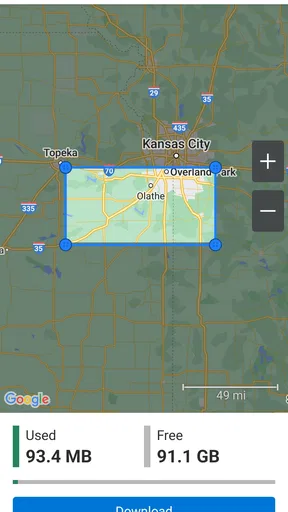
Yes, Garmin ActiveCaptain can be used offline. You can download charts and maps for offline use, which is particularly useful when you are out at sea and have no internet connection. This feature ensures you have access to important navigational data even in remote areas.
Are there any costs associated with using Garmin ActiveCaptain?
The Garmin ActiveCaptain app itself is free to download. However, certain features, like premium chart updates or additional map downloads, may require purchases. It’s advisable to review the in-app purchase options to understand any potential costs that may enhance your boating experience.
